YHModsManager
NightOcean’s Mods Manager
Game-Agnostic · Plugin-Driven




Table of Contents
Introduction
NightOcean’s Mods Manager is a plugin-driven universal Mod management tool that is not bound to any specific game but uses plugins as its core, supporting various games through game plugins.
Core Characteristics
| Feature | Description |
|---|---|
| One Manager, Multiple Games | Manage Mods for multiple games with a single manager |
| Community Extension | The community can develop support plugins for any game |
| Feature Extension | Features can be continuously extended through plugins |
Scope of Functionality
✅ What It Can Do
This tool focuses on Mod management and organization:
- View Information - View Mod name, version, author, dependencies, and other information (requires plugins to correctly parse metadata)
- Problem Detection - Detect missing dependencies, load order errors, duplicate Mods, and other issues
- Order Adjustment - Adjust Mod load order through drag-and-drop or smart sorting
- Profile Management - Save multiple Mod configuration profiles and switch between them at any time
❌ What It Cannot Do
| Limitation | Description |
|---|---|
| Does Not Load Mods | Mods are actually loaded by the game; this tool only generates configuration files |
| Does Not Provide Downloads | No Mod download functionality; obtain Mods through Steam Workshop or other means |
| Limited Deep Features | Some games’ deep customization features may not match dedicated managers |
Suitable Scenarios
Suitable Mod Types
This tool is suitable for managing non-intrusive Mods:
| Characteristic | Description |
|---|---|
| Independent Directory | Each Mod has its own directory and does not directly overwrite game files |
| Metadata File | Mods come with description files containing name, version, dependencies, etc. |
| Unique Identifier | Different Mods can be distinguished by ID or folder name |
Typical Examples:
| Game | Mod Metadata File |
|---|---|
| RimWorld | About.xml |
| Mount & Blade II: Bannerlord | SubModule.xml |
| Kenshi | *.info files |
⚠️ Note: For “intrusive Mods” that directly overwrite game files, this tool cannot manage them well.
I think this tool has a promising future: if the plugin ecosystem can be perfected, for those indie games or games that lack deep Mod management support, external Mod order management can be quickly achieved through this tool (of course, they need to handle Mod support and loading themselves).
Usage Recommendations
- Single Game Scenario: If you only manage one game and that game already has a dedicated manager, the dedicated manager may have more comprehensive features
- Multi-Game Scenario: If you play multiple Mod-heavy games simultaneously, or your favorite game doesn’t have a dedicated manager, this tool is a good choice (if someone develops plugins for it)
Development Advantages
The biggest advantage of this manager is that it is not bound to any game. Developing game plugins is very simple:
| Plugin Type | Lines of Code | Scope of Functionality |
|---|---|---|
| Basic Plugin | 400-500 lines | Basic Mod metadata parsing and management |
| Advanced Plugin | ~800 lines | Includes advanced features like save file reading |
💡 AI-Friendly Development: This project is developed in collaboration with AI, and plugin development is also very suitable for AI completion. Just tell AI your game’s Mod structure, and AI can generate a usable game plugin.
Core Features
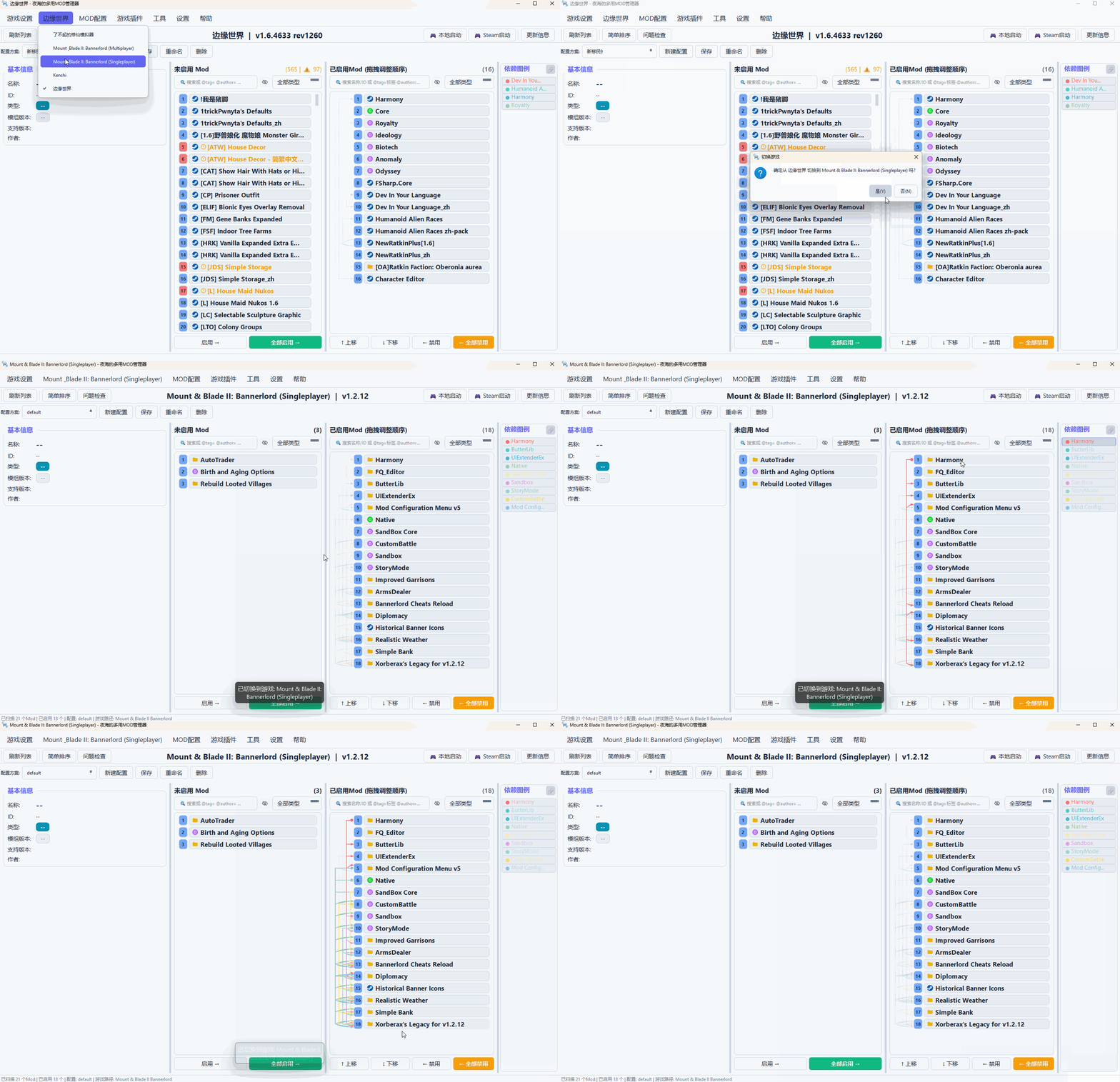
Multi-Game Support
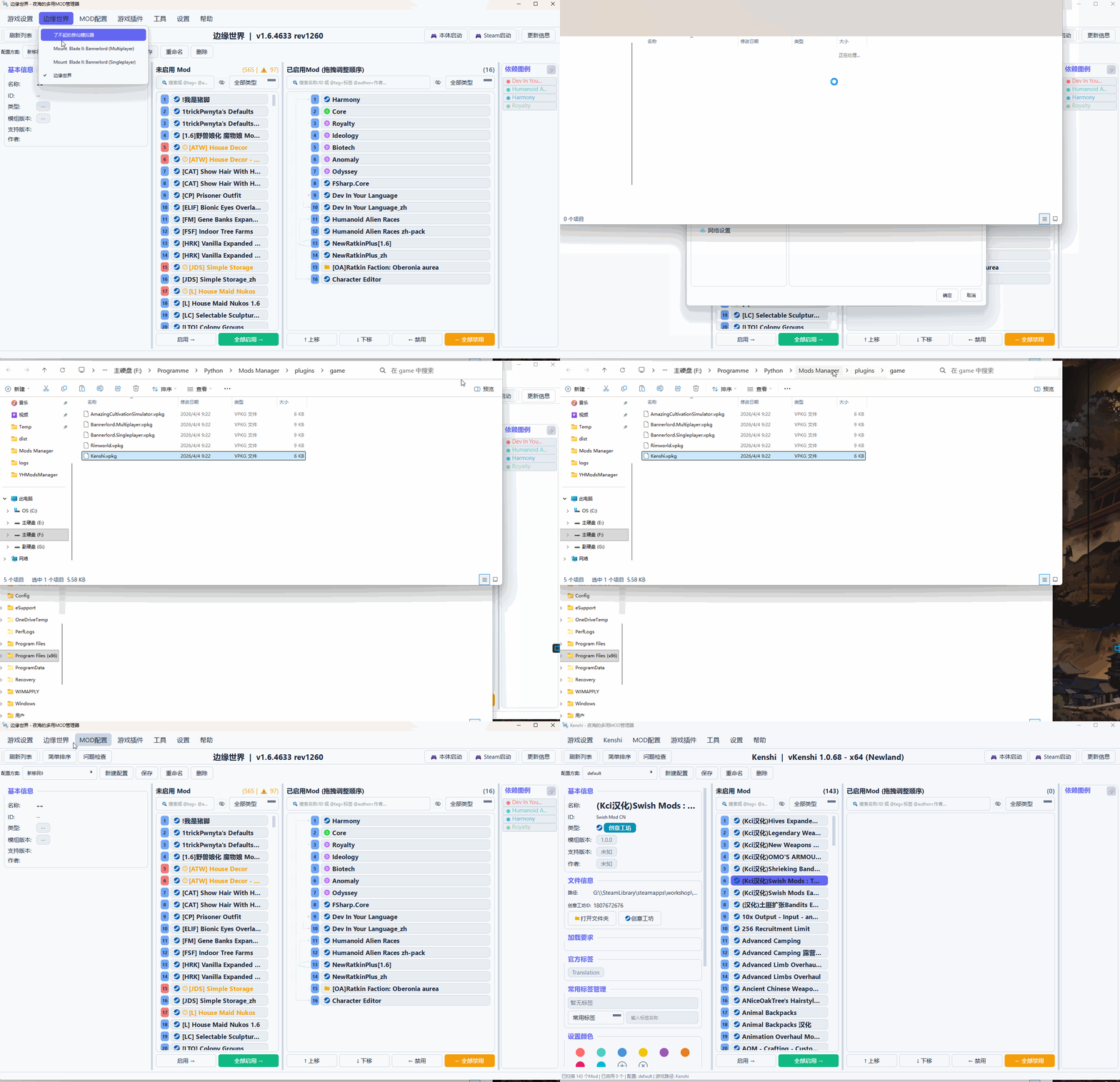
Supports multiple games through game plugins:
⚠️ Note: The main program itself does not contain any plugins. Plugins can only be developed by the community, since the vast number of games each may have different metadata parsing methods, only collective effort can handle this.
| Example Games | Steam App ID | Notes |
|---|---|---|
| Mount & Blade II: Bannerlord | 261550 | Multiplayer and singleplayer separated |
| RimWorld | 294100 | Includes save file Mod order import |
| Kenshi | 233860 | Basic functionality only |
💡 Example game plugins can be obtained from the Example Plugin Repository.
Want to support a new game? Just write a game plugin, no need to modify the main program.
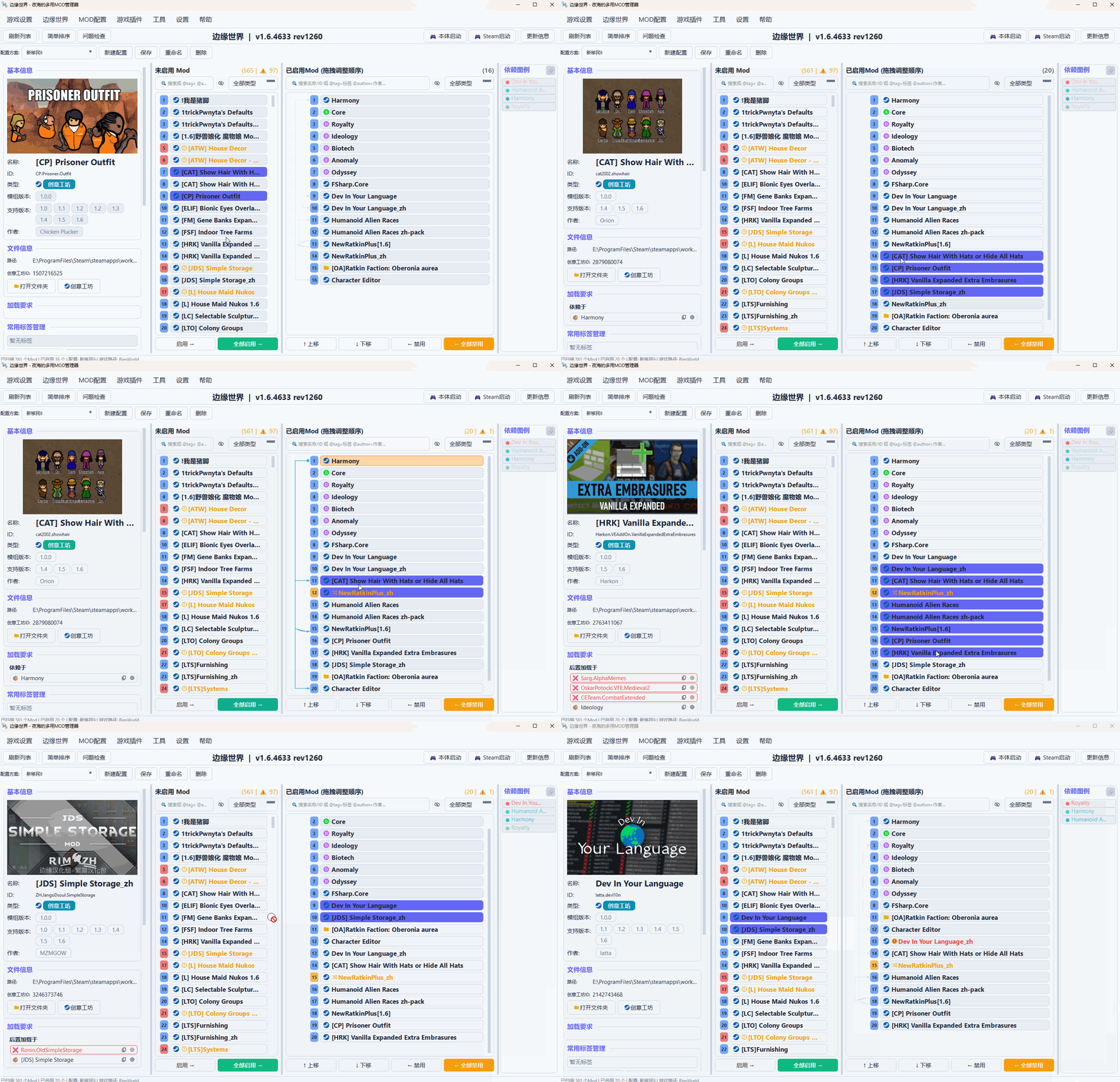
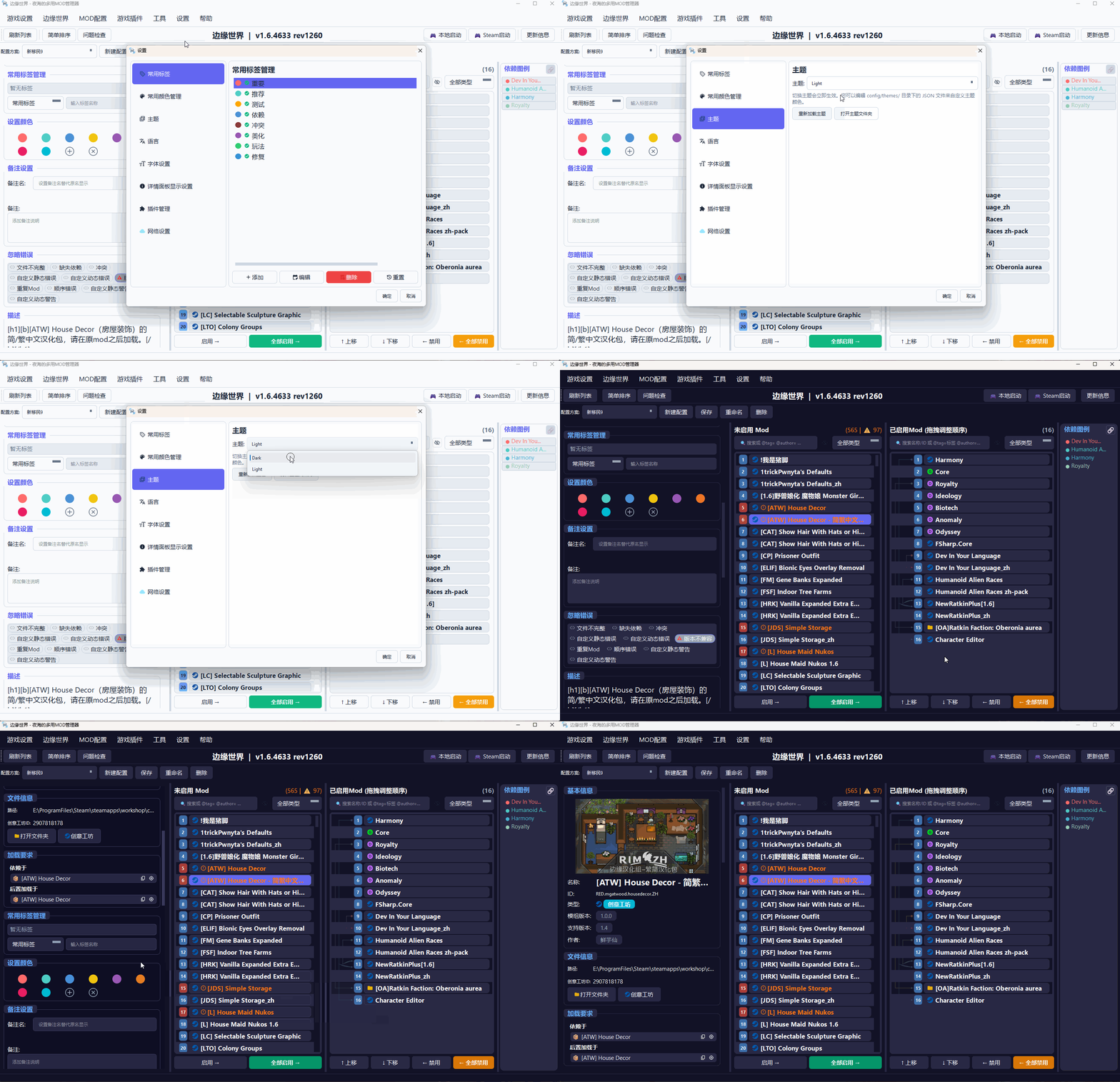
Interface Design
| Feature | Description |
|---|---|
| Dual-List Layout | Disabled on the left, enabled on the right, clear at a glance |
| Drag-and-Drop Sorting | Adjust load order by dragging |
| Dependency Visualization | Display dependencies between Mods through detailed info, highlighting, and dependency lines |
| Info Panel | View Mod details, tags, notes, etc. |
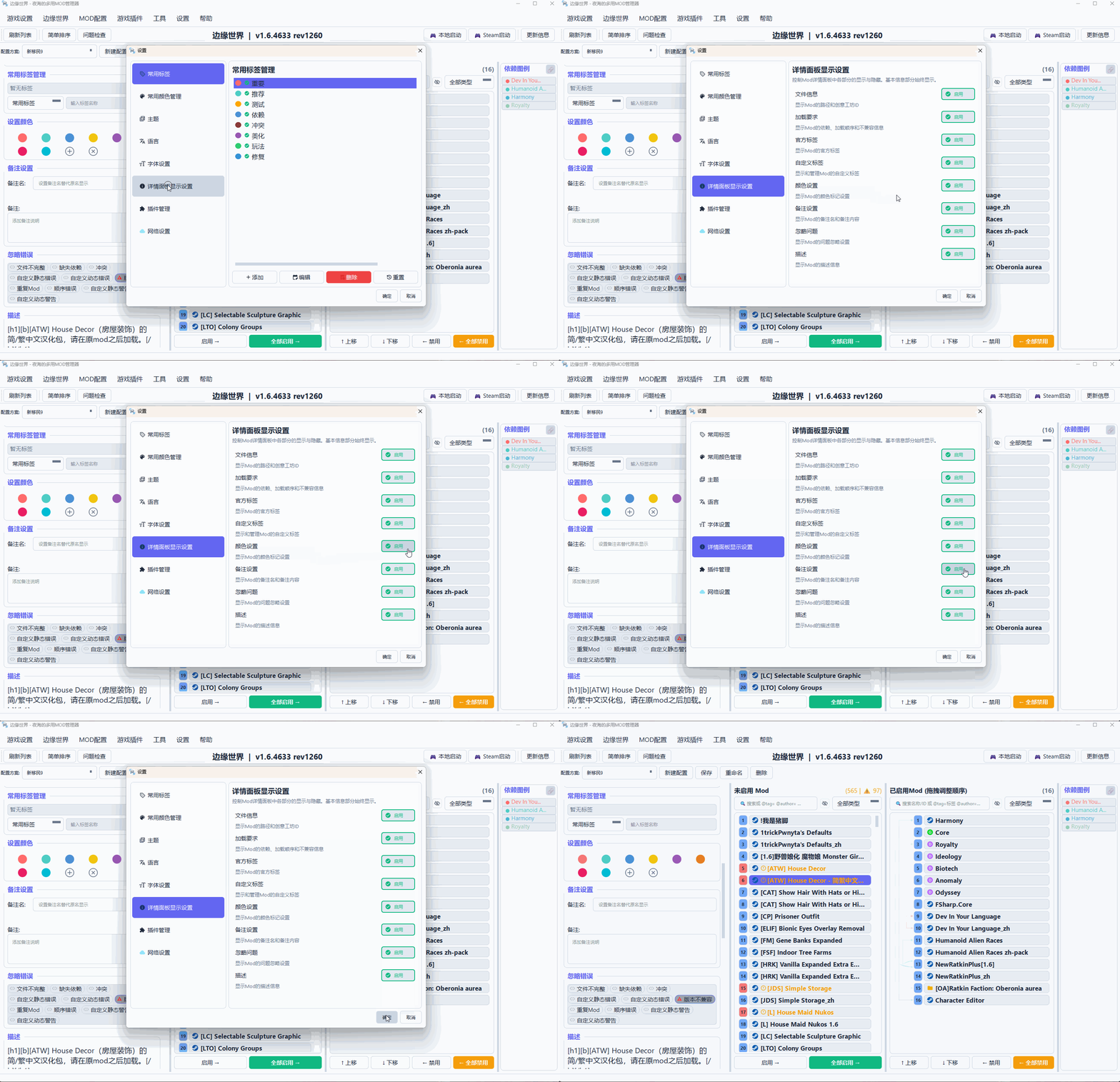
Management Features
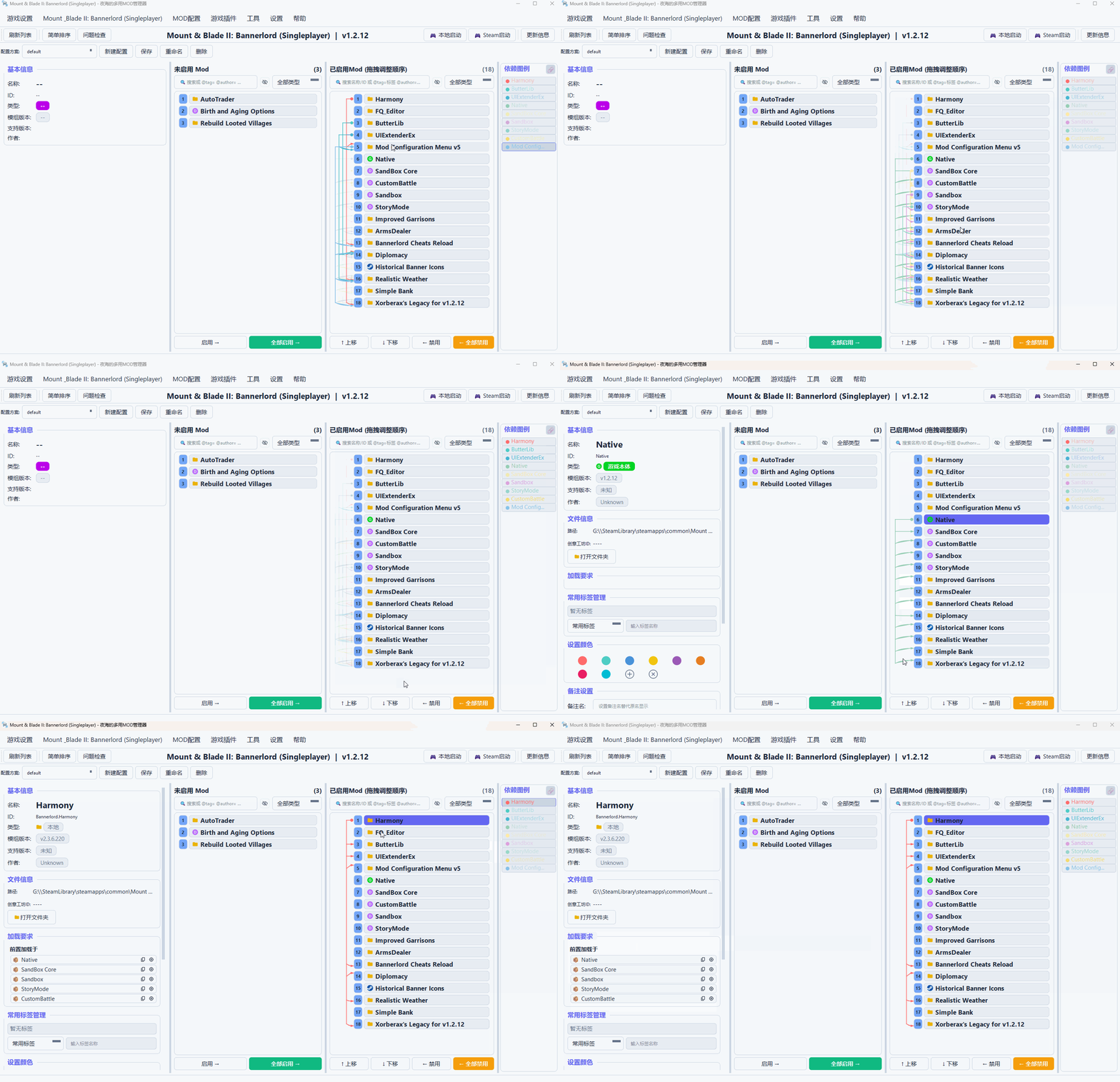
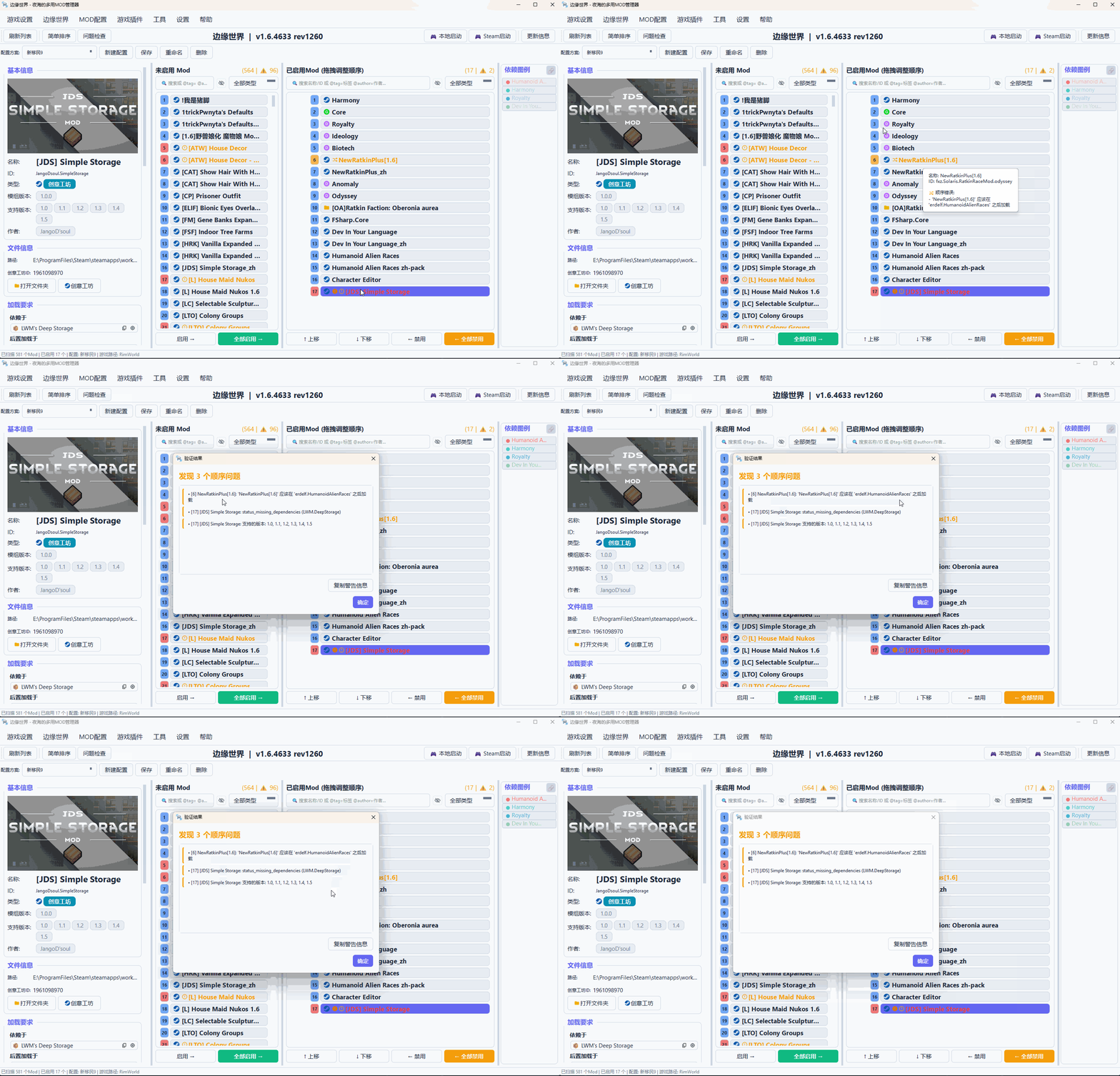
Dependency Management
| Feature | Description |
|---|---|
| Dependency Visualization | Display dependencies between Mods through detailed info, highlighting, and dependency lines |
| Simple Sorting | Automatically adjust order based on Mod-declared dependencies (for reference only) |
| Problem Detection | One-click detection of missing dependencies, order errors, and other issues |
Profile Management
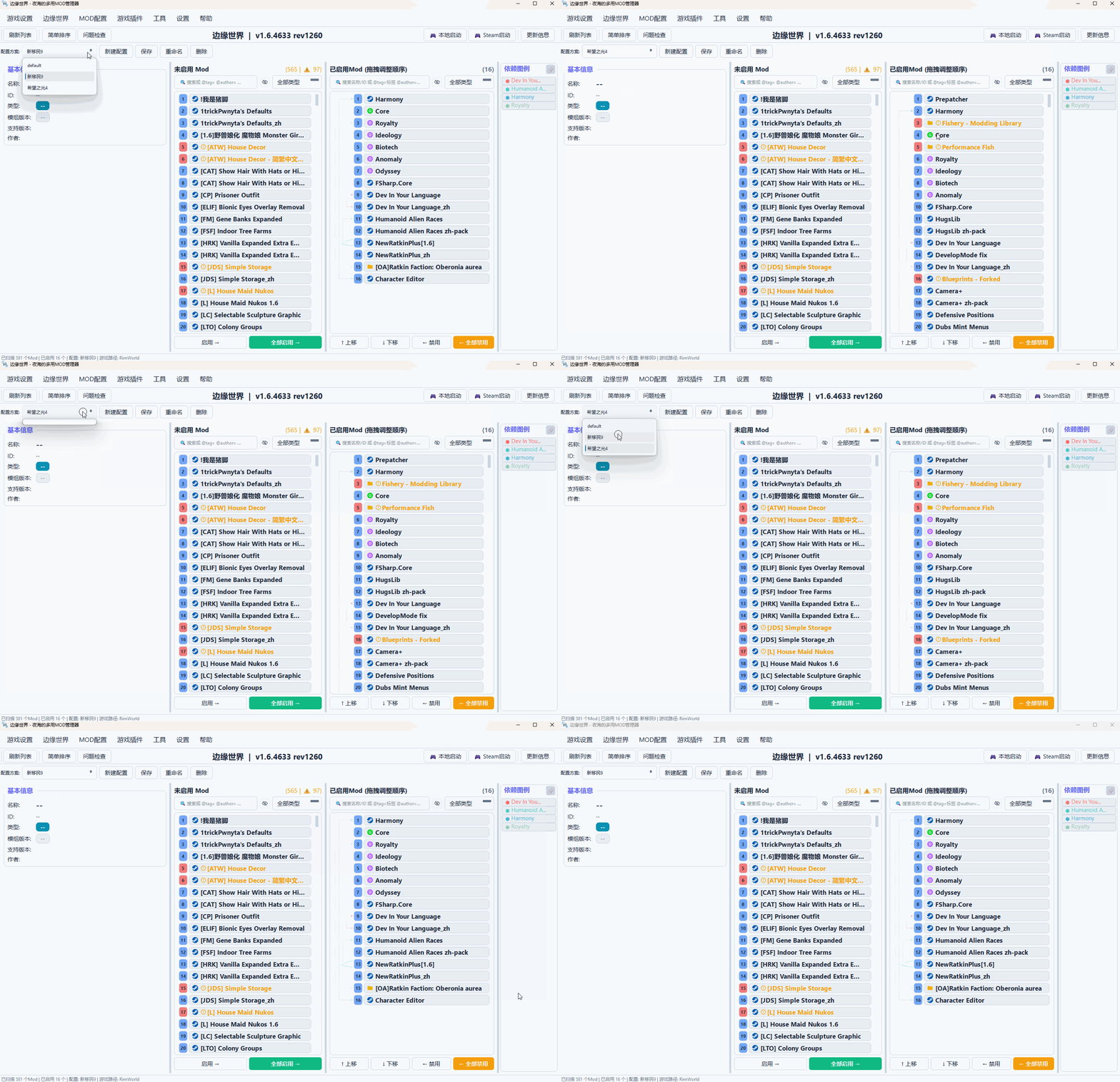
| Feature | Description |
|---|---|
| Multiple Profiles | Save different Mod combinations for easy switching between playstyles |
| Import/Export | Easy to share and backup configurations |
| Import from Save | Some games support restoring Mod configurations from save files (requires plugin support) |
Personalized Marking
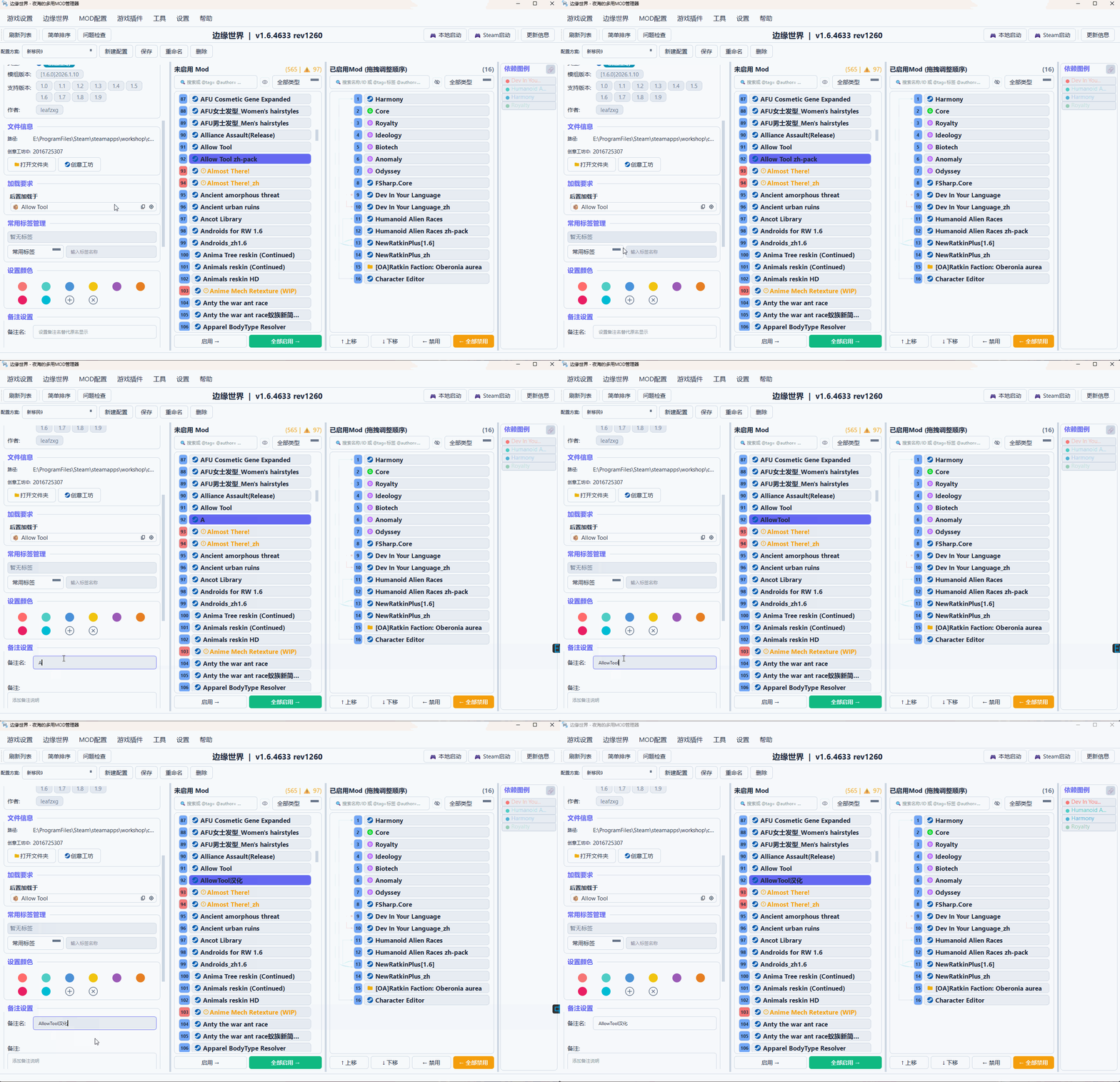
| Feature | Description |
|---|---|
| Tag System | Add tags to Mods for easier filtering |
| Color Marking | Mark Mods with colors for instant recognition |
| Notes Feature | Add notes to Mods; sometimes nicknames are easier to remember |
Search and Filter
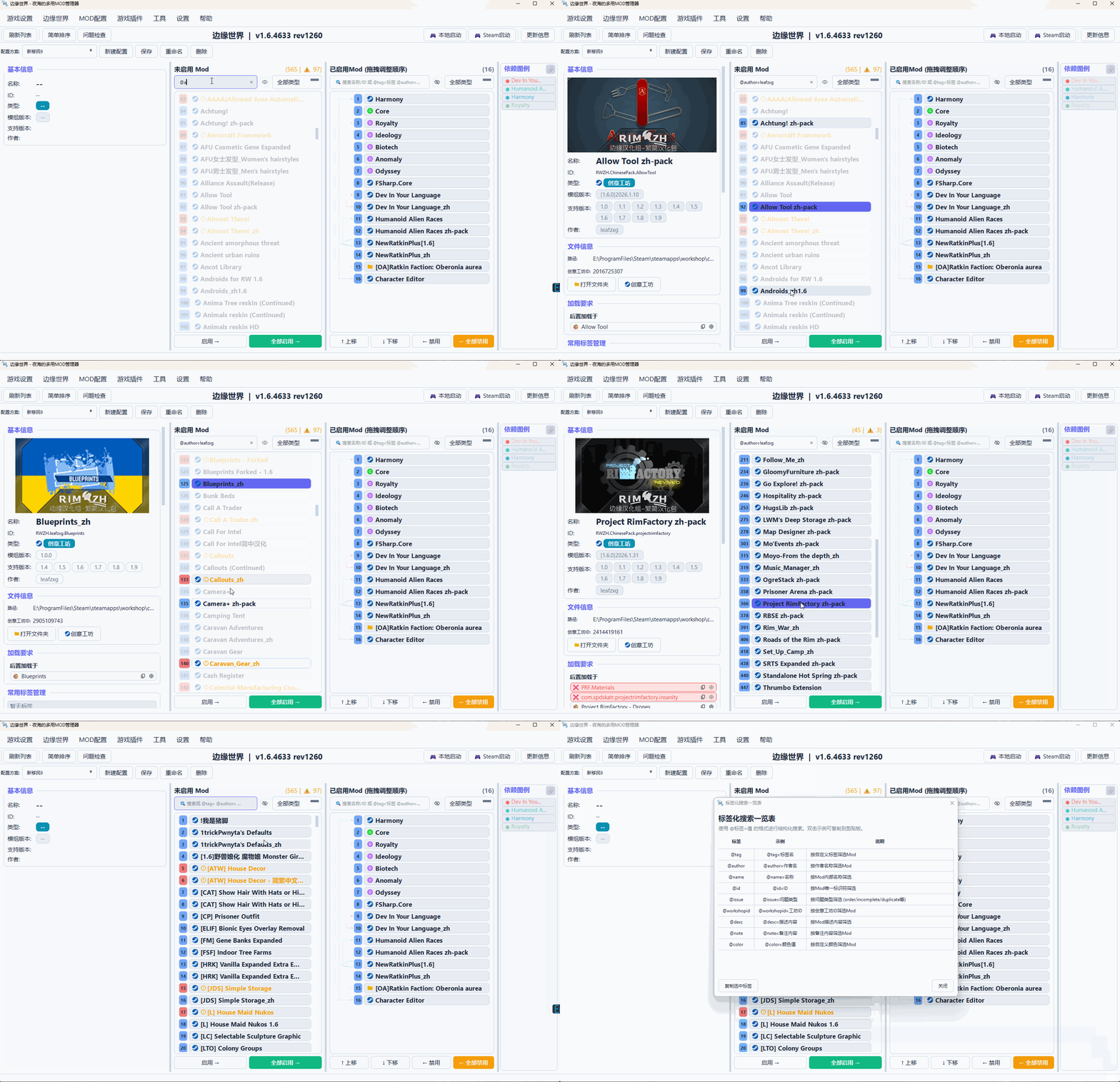
| Feature | Description |
|---|---|
| Keyword Search | Quickly find the Mod you want |
| Structured Search | Use syntax like @tag=tagname, @author=author |
| Type Filter | Filter by base game, DLC, Workshop, local Mod |
Themes and Languages
| Feature | Description |
|---|---|
| Multiple Themes | Default theme, dark theme, etc. |
| Multiple Languages | Chinese, English, etc. |
| Font Adjustment | Adjust interface font size |
Plugin System
The plugin system is the core feature of this tool.
Architecture Design
Traditional Mod managers usually only support one game with fixed functionality. NightOcean’s Mods Manager uses plugin-driven architecture:
┌─────────────────────────────────────────────────────────┐
│                 NightOcean's Mods Manager               │
│                    (Main Program Core)                  │
├─────────────────────────────────────────────────────────┤
│  ┌─────────────┐  ┌─────────────┐  ┌─────────────────┐  │
│  │ Game Plugin │  │ Game Plugin │  │   Game Plugin   │  │
│  │      A      │  │      B      │  │        C        │  │
│  └─────────────┘  └─────────────┘  └─────────────────┘  │
│  ┌─────────────┐  ┌─────────────┐  ┌─────────────────┐  │
│  │  Feature    │  │  Feature    │  │     Feature     │  │
│  │  Plugin X   │  │  Plugin Y   │  │     Plugin Z    │  │
│  └─────────────┘  └─────────────┘  └─────────────────┘  │
└─────────────────────────────────────────────────────────┘
Dual Plugin System
| Plugin Type | Description | Mutual Exclusivity |
|---|---|---|
| Game Plugin | Provides Mod parsing and launch functionality for specific games | Only one can be enabled at a time |
| Feature Plugin | Extends program functionality | Multiple can be enabled simultaneously |
Plugin Capabilities
Game Plugins Must Implement
- Parse game metadata and Mod metadata
- Provide game launch functionality (local launch, Steam launch)
- Define game-specific path validation rules
All Plugins Can Implement
| Capability | Description |
|---|---|
| Add Menu Items | Add own operations to menu bar |
| Add Toolbar Buttons | Quick access to plugin features |
| Add Custom Panels | Display plugin-specific interfaces |
| Subscribe to Events | Respond to Mod list changes, game switching, etc. |
| Custom Highlight Rules | Highlight Mods by conditions |
| Custom Filter Rules | Implement complex filtering logic |
| Independent Config Storage | Save plugin’s own settings |
| Extend Error Detection | Add game-specific Mod problem detection |
| Extend Context Menu | Add operations to Mod list right-click menu |
Game Plugins Can Also Implement
- Parse save files (import Mod configuration from saves)
- Parse external configuration files
- Custom topological sorting logic
SDK-Based Development
Plugin development is fully SDK-based; developers don’t need access to the main program source code. The SDK is released alongside the main program:
pip install yh_mods_manager_sdk-x.x.x-py3-none-any.whl
Simple Feature Plugin Example:
from yh_mods_manager_sdk import FeaturePlugin, PluginMenuItem

class MyPlugin(FeaturePlugin):
    PLUGIN_ID = "my_plugin"
    PLUGIN_NAME = "My Plugin"
    PLUGIN_VERSION = "1.0.0"

    def get_menu_items(self):
        return [
            PluginMenuItem(id="action", label="My Action", action_id="do_it")
        ]

    def on_menu_action(self, action_id, manager_collection):
        if action_id == "do_it":
            print("Action triggered!")
📖 Detailed Development Guide: Plugin Development Documentation 📦 Example Plugin Repository: YHModsManagerPlugins - Check it out for reference
Quick Start
The program is packaged as a standalone executable for one-click operation, no Python environment configuration needed.
Running the Program
- Download the executable for your platform
- Double-click to run
First Time Use
- Install Game Plugin - After the program starts, it will prompt you to install game plugins; select the plugin for the game you want to manage
- Set Paths - Specify the game installation directory and Mod directory (the program will attempt auto-detection)
- Scan Mods - The program automatically scans available Mods
- Start Managing - Enable, sort, and manage your Mods
Developer Guide
Project Structure
YHModsManager/
├── core/                    # Core business logic
├── ui/                      # User interface
├── plugin_system/           # Plugin system
├── utils/                   # Utility functions
├── config/                  # Configuration files
├── docs/                    # Documentation
└── yh_mods_manager_sdk/     # Plugin SDK
Core Architecture
The project adopts a layered architecture:
| Layer | Responsibility |
|---|---|
| UI Layer | Interface display and user interaction |
| Business Logic Layer | Mod operations, dependency resolution |
| Data Management Layer | Configuration, metadata management |
| Plugin System Layer | Plugin loading and scheduling |
| Infrastructure Layer | Logging, event bus, etc. |
Related Documentation
- Plugin Development Guide - Plugin development tutorial
License
The usage rights of this project are strictly divided into the following two modes, and users must comply with the corresponding rules according to their scenarios:
- Non-Commercial Use: Subject to GNU Affero General Public License v3.0 (AGPL-3.0), with full rights to use/modify/distribute;
- Commercial Use: Any form of use, modification, distribution, and derivation is strictly prohibited.
Non-Commercial Use License Terms (AGPL-3.0 Applicable)
License Text and Effect
- AGPL-3.0 Full License Text: LICENSE-AGPL
- Official Chinese Summary (not a substitute for the original): https://www.gnu.org/licenses/agpl-3.0.zh-cn.html
- Disclaimer: https://www.gnu.org/licenses/agpl-3.0.html#disclaimer
Legitimate Use Scenarios (Non-Commercial Use Only)
Personal learning and research, internal operations of non-profit organizations, open source community technical exchange, free sharing of modified non-commercial versions, and no direct/indirect economic benefits generated during use.
Rights You Can Freely Exercise
- Use: Free to run this software and derivative versions without functional limitations;
- Share: Copy and distribute complete copies of this software (including source code), with this license statement attached when distributing;
- Derive: Modify, transform, or create derivative works based on this software. Derivative works must be open-sourced under the AGPL-3.0 license and retain original copyright and modification records.
Mandatory Obligations to Comply With
- Source Code Disclosure:
- When distributing original/modified versions of the software, complete corresponding source code must be provided;
- When using modified software for network services (such as free online Mod management tools), a download link to the complete source code of the modified version must be provided to all users;
- Attribution Retention: Do not delete or tamper with copyright notices and license text within the software; when distributing or providing services, mark the original copyright attribution in a reasonable manner;
- Share-Alike: Derivative works must be distributed under the AGPL-3.0 license and may not attach any restrictive terms;
- No Technical Restrictions: Do not restrict others from exercising legal rights granted by this license through encryption, feature locking, or other technical means.
Commercial Use Terms
Explicitly Prohibited Commercial Scenarios (Including but not limited to)
- Embedding this software or its derivative works in paid software/services for distribution (such as paid game plugins, paid toolboxes);
- Enterprises/teams using this software for production operations, business management, and other profit-related activities;
- Providing paid Mod management services based on this software to third parties (such as paid configuration services, paid technical support);
- Developing commercial products based on this software for sale, or obtaining economic benefits through advertising, revenue sharing, etc.;
- Any use of this software’s functionality or code to save costs or improve efficiency for commercial entities.
Prohibition Statement
This project does not provide any commercial authorization channels. Any unauthorized commercial use is considered an infringement of this project’s intellectual property rights, and the project team reserves the right to pursue legal liability.
General Statements
- This software is provided as is without any form of warranty (including merchantability, fitness for a particular purpose), and the project team is not responsible for the software’s use effects, stability, and possible losses;
- If this project contains third-party open source code, that part of the code will be separately marked with its license agreement and subject to the corresponding terms;
- Derivative works for non-commercial use are also prohibited from any commercial conversion;
- The final interpretation right of this license agreement belongs to the project team.
Contributing
Welcome to participate in development, submit issues, or give suggestions! The author has limited experience in open source project management, please bear with any shortcomings.
- Issues and Suggestions: Submit through Issues
- Code Contribution: Pull Requests are welcome
Contributor Notice
All code contributors who submit Pull Requests to this project, the act of submission is deemed as agreement to the following terms:
- The contributor owns the complete copyright of the submitted code and has not infringed any third-party intellectual property rights;
- Grants the project team permanent, global, non-exclusive, free, irrevocable usage rights;
- Allows the project team to incorporate contributed code into this licensing system, only for non-commercial distribution and modification, and prohibits any commercial use;
- The project team has the right to modify, integrate, and distribute contributed code without further notice;
- If you do not agree to the above terms, please do not submit code.
Acknowledgments
Thanks to all contributors and supporters!